As part of the January 2017 ipage release, there will be new functionality that allows INTERNAL users with specific ipage roles to emulate any user. This resolves the issue of having to know a user’s password in order to troubleshoot issues.
Users with these roles will NO LONGER have visibility to user passwords in Internal Functions.
Instead, they will use the new emulate user feature.
Date for this change:
This change is currently scheduled to go live the afternoon of January 26, 2017.
What it means:
Internal ipage users who are accustomed to going to Internal Functions | User Admin | Search/Add/Edit Users to get user credentials for troubleshooting will no longer
have visibility to PW information on that page.
How to troubleshoot ipage user issues in the future:
- Log into ipage with your INTERNAL ipage credentials
- Find the ipage username of the user you need to emulate
(the user might have told you this, you may already know it, or you can still find the username in Internal Functions | User Admin | Search/Add/Edit Users).
- Click on Change User in the account area at the top of the page
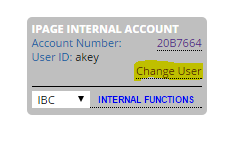
If your INTERNAL login previously had the permission to see user PW information, your Change User page will look slightly different:

On the modified Change User page, enter:
- The username of the user to be emulated
- YOUR Internal ipage password
Logging in in this way will emulate the user login.
You will be logged into ipage as though you logged in with the user’s username and password. Any actions you perform will be logged against the emulated user.
Password needed within ipage:
There are a few places in the site that require the user to re-enter the password. When emulating a user, re-enter YOUR Internal ipage password.
I want to be able to do this!
Permissions for this feature require Director-or-above approval.
If you could previously see user PW information in Internal Functions, this change will happen automatically for you.
If you think you need it now, please talk to your Director.
George, Donna. (2017, January 26). ipage Emulate User Functionality
Comments